
The whole customer on one card
When you last spoke, the latest quote, the latest order, what they bought each year. Before you pick up the phone, you know who you are talking to.
Sales software for Windows · Greek interface
Customers, communications, quotes and orders in one app. A quote takes a minute and comes out as PDF or Word, on your own template. And the whole team sees the same data the moment it changes.
Replica of the Sales Quotes app.
If answering means opening three spreadsheets and a notebook, Sales Quotes is for you. The answers are waiting on the Home screen, every morning.
Replica of the Sales Quotes app.
Features
Everything now scattered across spreadsheets, emails and sticky notes, in one app where every screen works the same way. Learn one and you know them all.
When you last spoke, the latest quote, the latest order, what they bought each year. Before you pick up the phone, you know who you are talking to.
Log a call, email or visit and when the next step is due. No answer? One click on “No answer” and the reminder stays open, as many times as it takes.
Price, number and expiry fill in on their own, and VAT and totals are calculated for you. One click and the quote comes out as PDF or Word, on your own template.
How many conversations became quotes and how many quotes became orders, your top 5 customers and products, how each salesperson is doing. Without building a single report.
Salespeople see their own customers; the Manager sees the whole business. Nothing is deleted by mistake: a salesperson requests a deletion and you approve it.
Download the template, paste in your customers and products and upload it. Up to 20,000 rows at a time, with no duplicates: if the VAT number exists, the customer is simply updated.
Code, price and VAT on every product, plus up to 5 fields of your own. A service that is not in the catalogue? It goes on the quote as a free-text line.
Tickets are created from the quote, with the customer, number and quantities already filled in, and you follow them step by step to delivery.
Production add-onGive the fields the names your office already uses, or start with the ready-made edition for your industry.
See how →Customers
The customer card gathers their whole history. Start a new communication or a new quote from here, with the customer already filled in.
Replica of the Sales Quotes app.
How it works
The same path every sale takes in your business, step by step inside the app.
Name, VAT number, phone. From then on, everything about them collects on their card.
Call, email or visit, with an outcome and a date for the next step.
If the outcome is “Quote”, the form opens straight away, linked to the conversation.
The customer said yes. The status changes and counts towards sales immediately.
Job tickets with QR codes move through the steps of your own production.
Add-onRecord what was delivered, and the app logs who and when.
Add-on⚡ Γρήγορες Ενέργειες
 PDFΈτοιμο για εκτύπωση/αποστολή
 WordΕπεξεργάσιμο αρχείο .docx
Νέα γραμμή
Καταστάσεις προσφοράς
Quotes
Upload your Word template once, with your logo and terms. From then on, every quote is ready to send in one click.
Reports
Reports update themselves with every move your team makes. The Manager sees the whole business; each salesperson sees their own numbers.
Replica of the Sales Quotes app.
Customisation
You do not change how you work to fit into an app. Give the fields the names your office already uses, hide what you do not need, and Sales Quotes speaks the language of your trade.
Replica of the Sales Quotes app.
Industry editions
The same app, set up from day one with the names, fields and steps of your industry. We set it up when your account opens, and your Manager can change anything afterwards. The edition pages are in Greek.
For office supplies and copier dealers. Customer equipment with serial numbers and FSMA expiry, compatible models in the catalogue.
AvailableSee it →
For print shops and copy centres. Tickets from the designer to packing, recurring jobs with a repeat reminder.
AvailableSee it →
For technical support and maintenance businesses.
Coming soonGet notified →
For workshops and small production units.
Coming soonGet notified →
For wholesale and retail businesses.
Coming soonGet notified →
For digital marketing and service agencies.
Coming soonGet notified →Don't see your industry? The general edition adapts to any trade. We show you how in the demo →
Appearance
7 themes, including Dark and High contrast. Everyone picks their own theme, text size, density and background, and the change shows instantly. Try it here (the app itself is in Greek).
Replica of the Sales Quotes app.
“Production” add-on
The salesperson clicks “Request production” and says when the customer needs it. The Manager turns it into job tickets with QR codes that move through the steps of your own production: cutting, painting, assembly, packing, whatever applies to you.
Replica of the Sales Quotes app.
What was written on the quote carries over to the job ticket. From then on, every move is recorded: who picked it up, when it was finished, when it left for the customer.
Optional · QR scanner
Every job ticket is printed with a QR code. The wireless scanner reads it in an instant and “types” the code into the app. The app does the rest.
1 · The ticketA4, A5 or A6 label, with a QR code
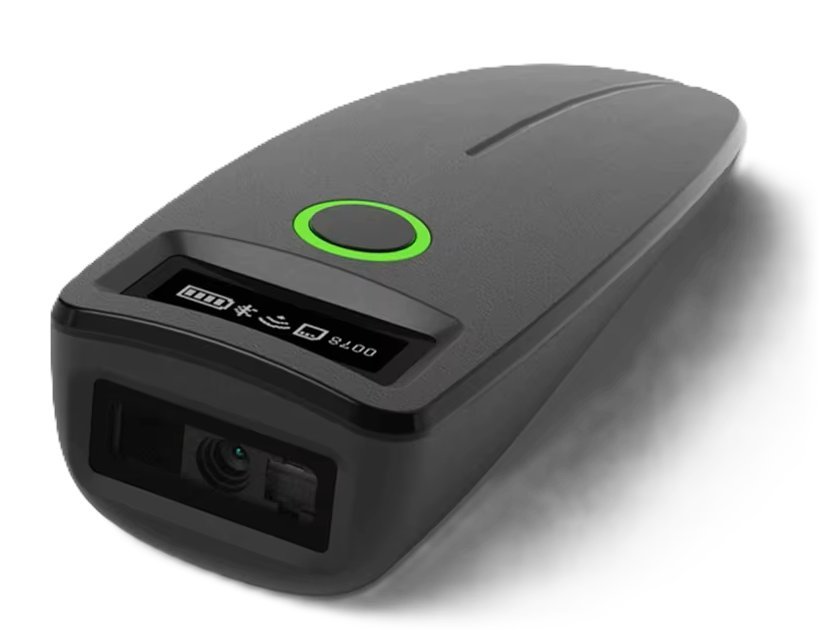
2 · The scanner2.4 GHz wireless or Bluetooth
3 · The appRecorded instantly, with a beep
New in the app · version 1.47
When a new version is out, the app shows it after you sign in, with “What's new”. You install it yourself, with no technician. Here is what arrived in the last few weeks:
And more
Security
What you need
Plans
Every plan includes all the core features. What changes is the number of users, quote documents per period and storage. You only add the extras you need.

14 days free. Get to know the app, with no commitment.
For the professional who makes the difference.
Your sales team, perfectly in sync.
The complete experience, with no compromises.
An automatic daily backup off the server, with access to the last 30 days.
Job tickets with QR codes, production steps, up to 5 Operators, tracking and delivery records.
Packs of 500 or 1,000 PDF or Word documents, for the months your plan is not enough. Valid for one year.
More storage space, above your plan's limit.
Monthly or yearly subscription, with a 14-day free trial. Request a demo and we will make you a proposal for the plan and extras that suit you.
FAQ
Both. You install an app on Windows, and your data is kept centrally on our server. So the whole team works on the same data from any computer, and you need no server or IT person of your own.
Not yet. The app interface is in Greek. This page is in English so that partners and decision makers outside Greece can find out what it does.
No. It needs a stable connection, because every change reaches the whole team immediately.
Yes, free for 14 days, with no commitment. Bring in your customers and products from Excel in minutes and work with your own data from day one.
There are plans with a monthly or yearly subscription, depending on the size of your team, and extras such as Production and Backup Plus. Request a demo and we will make you a proposal for what you need, without paying for what you don't.
Today there are ready-made editions for Office Supplies (office supplies and copiers) and Printshop (print shops). Service, Workshop, Commerce and Agency are coming. Even without an edition, you give the fields the names your trade uses.
Yes. On the customer tab, in the product catalogue and on job tickets you set your own labels, hide what you do not need and choose where search looks. This also applies when you start with an industry edition.
Yes. A service or job that is not in the catalogue goes in as a free-text line, with its own description, quantity and price. If you use it often, the Manager can save it as a product.
From inside the app. When a new version is out, you see it after signing in, together with “What's new”, and install it in one click.
Yes. You upload your Word template and the app fills it in: one for retail and one for wholesale. New logo or different terms? Edit the Word file and upload it again.
You can bring them in with a CSV file in minutes, up to 20,000 rows at a time. The app tells you how many were added, how many were updated, and if something did not go in, which row and why.
No. The scanner is optional and helps with Production when many packages arrive at once. Without it, you type the ticket code.
The developer of the app, directly, with no call centre. From inside the app you can send us the log files in one click, so we can see right away what happened.
Next step
Book a personal demo. We walk you through a sale from start to finish and answer any question you have.